multilist
This applies to: Visual Data Discovery
The multilist variable is part of the array of objects you use to define data and non-data values for this visualization.
 You must be an administrator to manage custom visual types.
Type
multilist
Editor
multilist have two modes:
-
If the
valuesproperty is provided, the variable is represented by a multi-select tag input.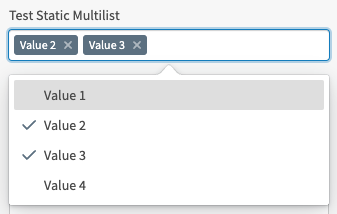
-
If
valuesis not provided, the variable is represented by a control that provides an arrangeable list of fields that includes an edit button. Users can select which fields should and should not be included.
Variable Specific Properties
| Property | Argument | Description |
|---|---|---|
defaultValue
|
array of strings | Only applicable for the static value list. |
values
|
array of strings | The options made available to users for selection. |
Generic Properties
Generic properties apply to many variables.
| Property | Argument | Description |
|---|---|---|
name
|
string | The name of the property. It must be unique among all variables on the visualization. This name is used to access the data accessor and/or variable value on the controller provided to the visualization. |
descr
|
string | A description of the variable for your reference. This is not displayed in the UI. |
attributeType
|
array of strings |
A list of field types to include when selecting fields for this variable. Accepted values:
|
required
|
boolean | Triggers the UI to require a value for certain variable types. Not used for this variable type. |
Deprecated Properties
| Property |
|---|
| None. |
Samples
Static Values
{
	"name": "Test Static Value Multilist",
	"type": "multilist",
	"descr": "Select multiple values. Order is not selectable",
	"values": [
		"Value 1",
		"Value 2",
		"Value 3",
		"Value 4"
	],
	"defaultValue": [
		"Value 2",
		"Value 3"
	],
	"required": false
}
Field Selection
{
	"name": "Test Field Multilist",
	"type": "multilist",
	"descr": "Select and arrange multiple fields",
	"attributeType": [
		"ATTRIBUTE",
		"TIME",
		"NUMBER",
		"INTEGER"
	],
	"defaultValue": [],
	"required": false
}